
Direct Deposit
Enroll in direct deposit and receive your paycheck or government benefits up to 2 days early.1
Get your money faster
You can set up your payroll checks or government benefits to go directly to your account – and you can receive them up to two days faster.1 With Serve, speed is on your side.

Here's how to enroll in direct deposit:
-
Account & routing numbers
Log in to your account, go to Money In, and then Direct Deposit to view your account & routing numbers.
-
Enroll
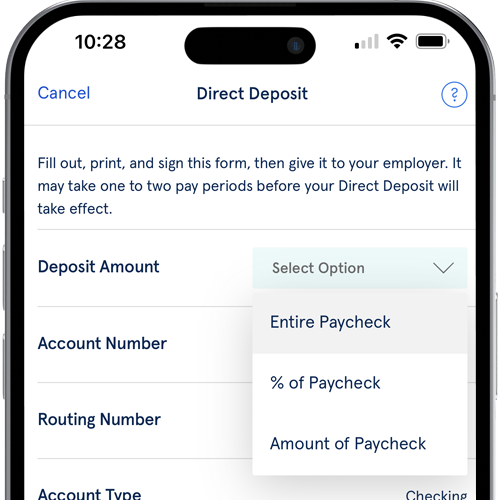
Use & print the form on the Direct Deposit screen and give to your employer or use your account & routing numbers to enroll directly with your employer.
-
Get your money faster.1
It can take up to two pay cycles for the direct deposit enrollment to take effect. After that, enjoy receiving your pay up to two days early!
FAQs
-
1. Make sure that:
Your Serve account is active.
You have successfully completed online registration and email verification.
For Serve® American Express® Prepaid Debit Accounts, you must have also activated the personalized Serve Card you received in the mail.
Your employer or payroll department offers direct deposit.
Your direct deposit comes from a U.S. bank account.
The direct deposit does not exceed the maximum balance and monthly limits specified in the Fees and Limits section of the appropriate Consumer User Agreement, Cardholder Agreement, or Deposit Account Agreement for your Serve Card.
For Federal tax refunds via direct deposit, the information on your refund, including your Social Security Number, must match the information we have on file. If you are filing jointly, please make sure that your Social Security Number is listed first on your Tax Return. Please note that there is a limit of two tax refunds per calendar year per Serve account.
2. To set up direct deposit, follow the steps below:
Log in to your Serve account and go to Money In.
Select Direct Deposit to view your Serve Account and Routing Numbers.
Print out and complete the Serve Direct Deposit Form and submit it to your employer or benefits provider to process the request. Certain employers may require you to use their own form or process. It may take one or two pay periods before your direct deposit will take effect.
Please note that the Serve account number and Bank Routing numbers found on the Serve Direct Deposit Form can only be used for adding your paycheck or Government Payments to the Serve account and cannot be used for other payments. For payments from your Serve account, please use the Pay Bills option.
For Serve® American Express® Prepaid Debit Accounts, please see the appropriate Serve Prepaid Debit Account Consumer User Agreement for more information about direct deposit.
For the Serve® Pay As You Go Visa® Prepaid Card, please see the Cardholder Agreement for more information about direct deposit.
For the Serve® Bank Account, please see the appropriate Deposit Account Agreement for more information about direct deposit.
-
Your Account and Routing Numbers are easily accessible via the My Profile section of your online account.
Log in to your Serve account and go to My Profile.
You will see Account and Routing Numbers listed under the Account Information section.
-
Yes, Direct Deposit can be set up for Federal payments. For example, the payment can be a tax refund, Social Security payment, SSI payment, civil service retirement payment, VA compensation/pension, Worker's Compensation, or a Federal Employee payroll deposit. Please use the Serve account number and Bank Routing number found on the Serve Direct Deposit Form.
-
You can get your paycheck up to 2 days before payday.1 You can access your money as soon as the funds are electronically added to your account. It may take up to two pay cycles after you sign up for Direct Deposit with your employer or benefits provider for your Direct Deposit to begin.